Annual leave is great for recharging your batteries – but managing staff holidays can turn into a scheduling nightmare.
WhosOffice empowers companies to coordinate leave requests alongside shift planning, to ensure that vacations do not affect business productivity. Our built-in leave management tools centralise all paid leave requests, time off in lieu, sickness and other absences, for a transparent view of who’s available to work.
Make better-informed decisions on staff leave
Many companies only realise they’re understaffed at the 11th hour. By integrating leave management with shift planning, WhosOffice provides you with a complete overview of all absences – so you know which gaps you need to fill.
- Manage requests and approvals through one online system
- Create custom rules to match your company policies
- Combine paid and unpaid leave requests, TOIL, sick leave and personal appointments
- Give everyone in your business visibility of the holiday calendar
All absences are logged centrally, so managers and HR can make informed decisions, based on accurate information about who has already booked time off.
WhosOffice gives you the flexibility to run leave management your way.
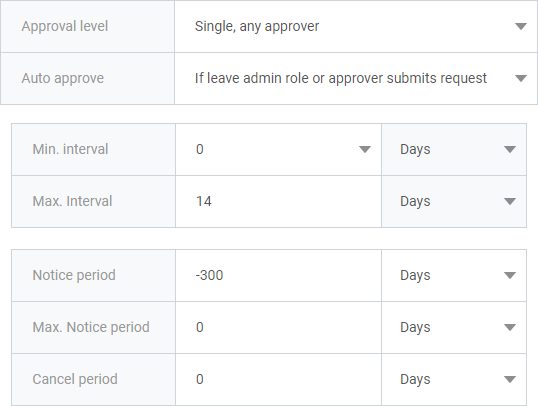
Using our platform, you can customise processes to fit your policies – setting minimum and maximum time off allowances, notice periods and cancellation periods.
You can also create leave policies to match your company contracts, including which types of leave employees can accrue, and whether they can carry time over to a new holiday year.
Requesting time off is seamless with WhosOffice – whether employees are on holiday for one day, or bulk booking leave.
The whole process is managed online, ensuring quick, informative and paperless responses. We also offer multi-approval options, so you can decide who’s involved in the chain of command.
What types of employee leave can I track using WhosOffice?
In addition to managing paid annual leave, WhosOffice can record and manage other types of time off including time off in lieu (TOIL), overtime, sick leave, medical appointments, external meetings, training days, maternity leave and bereavement leave.
Many companies are already tracking leave through a spreadsheet or separate online system, but WhosOffice brings together all your staff management tools on one cloud-based platform. Read our blog post on whether you need a separate leave management system for further guidance.
Can everyone see who’s booked leave on an online calendar?
Yes! One of the major benefits to using WhosOffice is a single, central online holiday calendar that everyone in your business can view.
By giving your whole team visibility of your holiday planner, you can cut out unnecessary admin and communications. For example, staff can check who’s already booked time off before making their holiday request to ensure there are no critical calendar clashes.
It’s worth noting that while everyone can see the holiday calendar, only users with the appropriate permission levels can edit it. You can also set the level of detail that general users can see to avoid sensitive information being shared.
Can I customise the process for approving leave requests?
Yes, you can. Some types of leave need to be recorded in your online calendar, but they don’t need approval – such as an external meeting or training event, or a dentist/doctor appointment.
Other types of time off such as annual leave or time off in lieu will need to go through a formal approval process. You can set both who needs to approve these requests and who will be notified once a request has been approved.
How do staff members find out if their leave request has been approved?
WhosOffice is completely paperless, which means employees receive email or mobile app notifications when their holiday request has been reviewed and accepted or denied.
Will approved holiday requests be added automatically to the staff holiday calendar?
Yes, once a request is approved it is added to the calendar within WhosOffice, to ensure that staff are always seeing the most up-to-date version of events.
Can I set how many days’ holiday each member of staff receives?
Many companies have employees on differing holiday allowances – for example, part-time versus full-time staff, or team members who are entitled to additional days off as a reflection of their commitment of long service. Some companies also permit annual leave to be carried over to the next holiday year, which can affect total staff allowances.
With WhosOffice, you can set up an individual holiday entitlement for each person within your company. You can also edit that allowance whenever you need to.
Can I see how much leave employees have left to use?
Yes! In addition to tracking each person’s total holiday entitlement, WhosOffice deducts annual leave from their allowance whenever time off is requested. So employees can log in at any time to check their latest leave allowance, and managers/HR personnel can also check staff entitlements to make sure staff are steadily using their leave throughout the year.
Can staff view and update holiday requests via their smartphone?
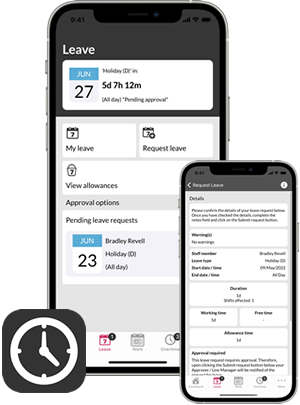
Yes they can via the WhosOffice mobile app for Android or iOS.