You’re employing talented people – but how well are you using their skills?
WhosOffice empowers businesses to understand every person in your organisation, and make sure the best mix of people are on shift at all times. Creating employee records also enables you to track their progress, keeping an eye on annual leave entitlements and other perks of the job, to support staff retention and progress.
Build staff profiles
WhosOffice is the perfect platform to capture workforce data. Every person can be set up as an individual user in our software, so you can manage their contributions more effectively:
- Detail people’s skills, competencies and qualifications
- Cross-match employee profiles to plan the right people for each shift
- Set staff entitlements including holiday allowance, TOIL and overtime
- Pull quick reports or detailed analysis to monitor performance and progress
Each record can be customised according to a worker’s job function, location and time zone, to make sure they are operating within the terms of their contract.
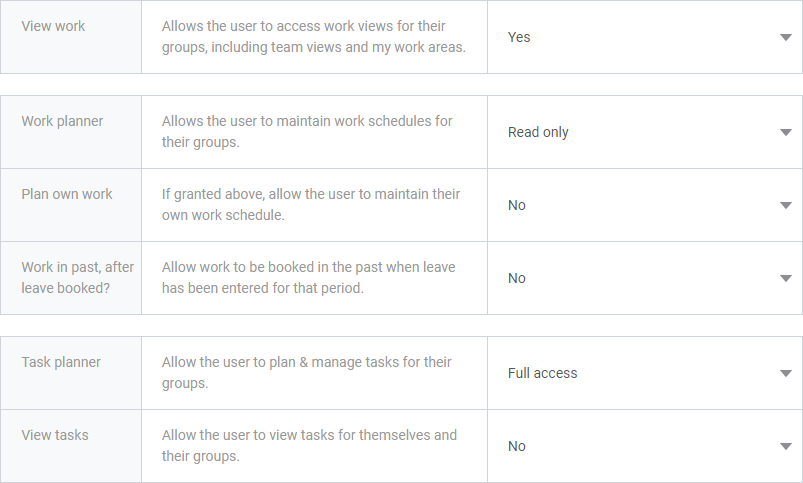
Control system access
As each staff member is an individual user, you control their access to the WhosOffice system – and who is involved in any decision-making.
For example, workers may require different approvers for leave and overtime requests, depending on their department.
Similarly, team leaders and managers need the ability to run reports and analysis, whereas general employees only require basic information. WhosOffice tailors the features they can use when they log-in with their office credentials.
Smarter working processes
As your company grows, you need to be careful with admin requirements.
Our platform includes an intelligent spreadsheet template, so you can bulk-import data to quickly set-up new users. This includes identifying specialist skills and roles, such as whether they are first aid qualified, or if they have been DBS checked.


